

No two loans travel the same path.
Every rule your team adds travels all of them.
Your workflow stops running on a diagram and starts running on the loan itself. Work fires the moment a file is ready for it — clerical work handled, exceptions routed, conditions built. And every rule your processors, underwriters, and QC team add runs on every loan that follows.
How the engine decides
Nothing waits for its turn.
Most automation runs on a map somebody drew in advance — sales to processing, processing to underwriting, back again. The map assumes loans arrive in a predictable state. They never do. So work sits in a queue waiting for its turn while everything it needed showed up days ago.
eqLend doesn’t remove the structure. It makes it finer. Instead of one diagram every loan has to fit, the engine holds thousands of explicit rules your team owns and can read. Every time something changes on a loan — a document lands, a field updates, a status moves — it re-reads the whole file against all of them and decides what runs next. Work starts when the loan is ready for it, not when the diagram says it is your turn.
-
1
The file lands in the LOS. That is the first event.
Before anyone opens it, the rules read what the loan actually is and build the needs list for this borrower — this program, this property, this income structure. Not a generic checklist living on somebody’s desktop that has to be edited loan by loan to mean anything.
-
2
Credit runs. The AUS findings come back.
Each response is another event, and tasks fire off what the loan turns out to be rather than the stage it happens to be sitting in. The needs list is already narrowing before a processor has touched it.
-
3
Something on the file changes.
A document lands in the eFolder. A service order comes back. Someone edits a field by hand in the LOS. The engine does not care which — only that the loan is now different from what it was. Say it is the homeowners insurance binder: the rules for that event call the reading module, which identifies it and pulls the carrier, the premium, the coverage amount and the effective dates.
-
4
That extraction is itself the next event.
This is the part that is not branching. The engine does not run a script from top to bottom and stop. Every write is a new event, read fresh against every rule in the system — whether it came from a module, a service, or a person.
Which is why the chain never has to be designed in advance. It assembles itself out of whatever the loan just became.
-
5
Conditions appear on the file — with the document already attached.
Coverage against the loan amount. Effective date against the note date. Mortgagee clause against your requirements. Evaluated the moment the data exists, and the document that satisfies the condition is tied to it, so nobody goes hunting for something the file already has.
-
6
Then it happens again, for the life of the file.
Tasks and conditions refresh as the loan matures — re-read against the whole file every time anything changes. There is no next station waiting to be reached. There is only the next thing that just became true.
The events drive the work as soon as they happen — not fifteen minutes before closing.
That is the speed argument, and it is the smaller one. The larger one is what event-driven tasking makes possible that a linear workflow cannot: when work is triggered by the state of the loan instead of the station it is sitting in, a rule written today can fire at the earliest moment any future loan reveals the problem.
In a linear system you can capture exactly the same judgment, and it will still only run where the map already put the check. The knowledge accumulates but it never moves. A linear workflow can grow a checklist. It cannot compound a loop.
The Positive Feedback Loop
Loans move forward. Knowledge moves back.
eqLend is the engine. Your team is the intelligence that runs it. Three departments. One continuous cycle. Every loan makes it better.
Errors caught at intake
The engine reads and classifies every document the moment it arrives — your processors review only what it flags, not the whole stack. And every exception they catch teaches the system: each correction becomes a rule the engine never forgets, so fewer problems reach underwriting on every loan that follows.
- Document exception review routed to the right processor
- Every dismissal or correction feeds rule refinement
- Queue gets shorter as the system learns
Your best underwriter, on every file
Conditions are generated automatically from rules your team owns and can see. When an underwriter tightens one, adds one, or overrides one, that judgment doesn’t stay on her desk — it becomes part of the engine permanently. Expert decisions stop being individual heroics and start being institutional standards.
- Automated condition generation from lender-owned rules
- Exception-only workflow — underwriters touch what matters
- Conditions evolve as underwriters refine the logic
Hindsight becomes foresight
QC stops being a rear-view audit. Every post-closing finding is translated into a new rule upstream — the defect found once is prevented forever. And because the engine is event-driven, that rule does not have to live where it was learned — it relocates to the earliest moment a loan’s state can reveal the problem. Your QC team shifts from documenting what went wrong to architecting what goes right.
- Post-closing audit findings converted to active rules
- 3,300 rules in production at a national Encompass lender and growing
- QC becomes the engine’s feedback mechanism, not just a checkpoint
The person who finds it decides what fires next
A processor sees the same exception for the third time. An underwriter tightens a condition. QC traces a defect back to where it started. They decide what should happen on the next loan — and eqLend builds the rule. Authoring is technical work, so that part is ours. Deciding what the engine does is your business, so that part stays yours.
That is the alignment. The engine does not arrive with an opinion about how loans get manufactured and ask your shop to conform to it. It takes direction from the people already doing the work.
And you can watch it turning
Every task the engine handles, human or automated, carries three timestamps: queued, started, finished. That yields real SLAs by task type, real elapsed durations, real rework counts.
Linear systems report milestone touch counts — proof a file moved, not what it cost you to move it.
Your team finds the problems. The engine remembers them — and moves them upstream. Prevented forever is the easy half. Prevented earlier is the half that compounds. Over time your operation stops relying on individual heroics and starts running on shared knowledge. That’s not just automation. That’s a culture.
The economics
What is a loop that keeps learning actually worth?
We built a model to answer that, and published all of it — including the assumptions that make the number smaller.
It never assumes you cut anyone. Every gain is hiring you avoid as volume grows, not people you let go. And where we had to guess how much of an underwriter’s day is clerical work, we guessed low: a lender already running this reported better results than the model predicted.
Disagree with a number? Change it. The curve moves with you.
No email required to run the model. When you are done, build a business case in your own numbers to take to your team.
Modelled on a representative 15,000-unit operation scaling to 30,000. Your figures will differ — that is the point of the calculator.
Experience Layer Options
Your automation. Your interface.
Most platforms force a single UI on every role. eqLend gives you three deployment modes — choose the one that fits your team’s adoption reality, or combine them.
Silent Delivery
zero new UI, zero adoption risk
Purpose-Built Role Screens
designed for speed
Hybrid
silent delivery + role screens where it matters
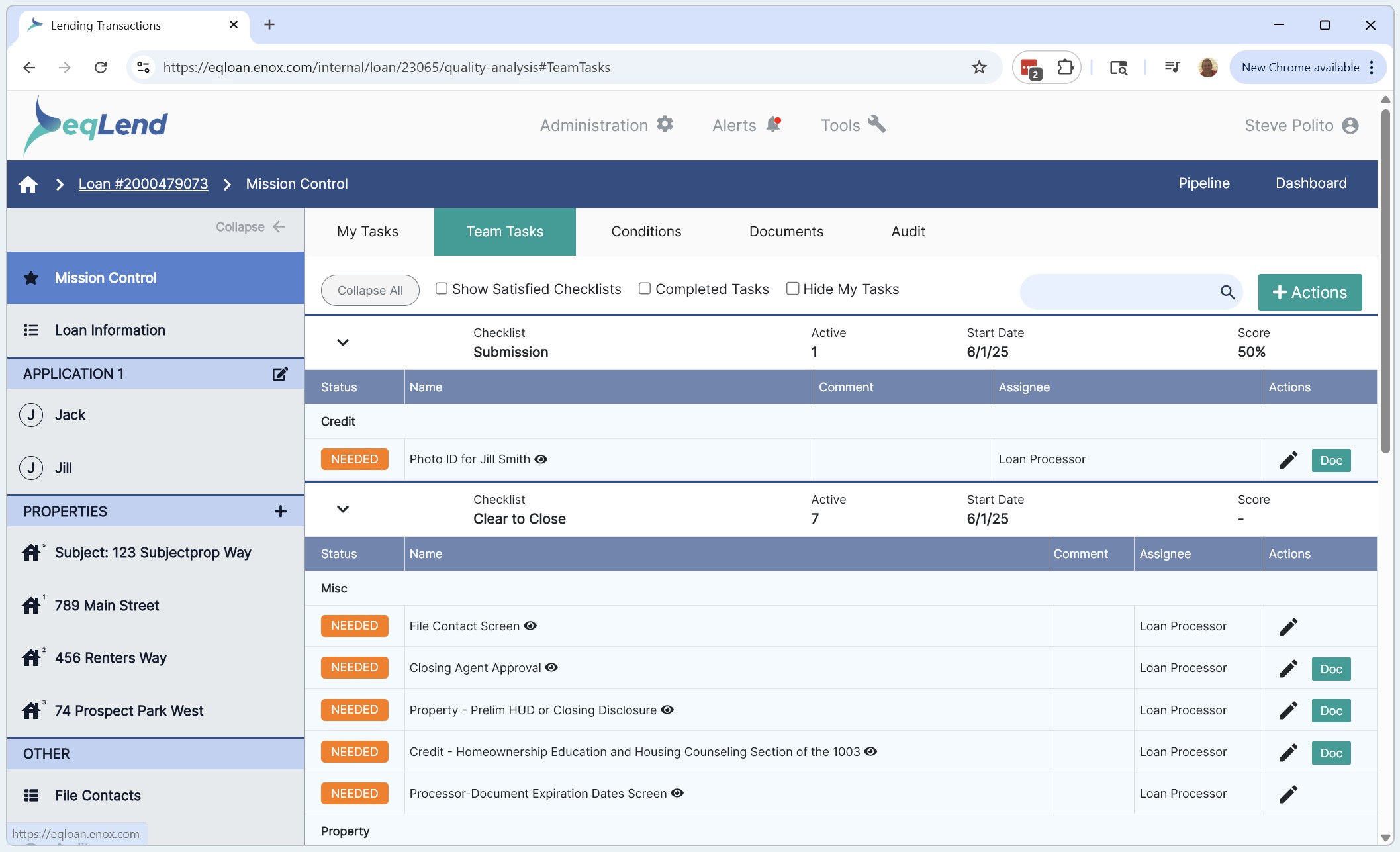
Task Dashboard & Follow-Up
Purpose-built for processors and operations teams
A unified command center for pipeline-wide task management. Visual overview of task status and due dates, filterable by team member, branch, or task group — with drill-down to individual loans.
- Real-time task status and due date tracking across the full pipeline
- Multi-channel notifications — email, SMS, push — keeping every party informed
- Filter by team member, branch, task group to surface bottlenecks instantly
- Toggle between My Tasks and Team Tasks for individual or management views
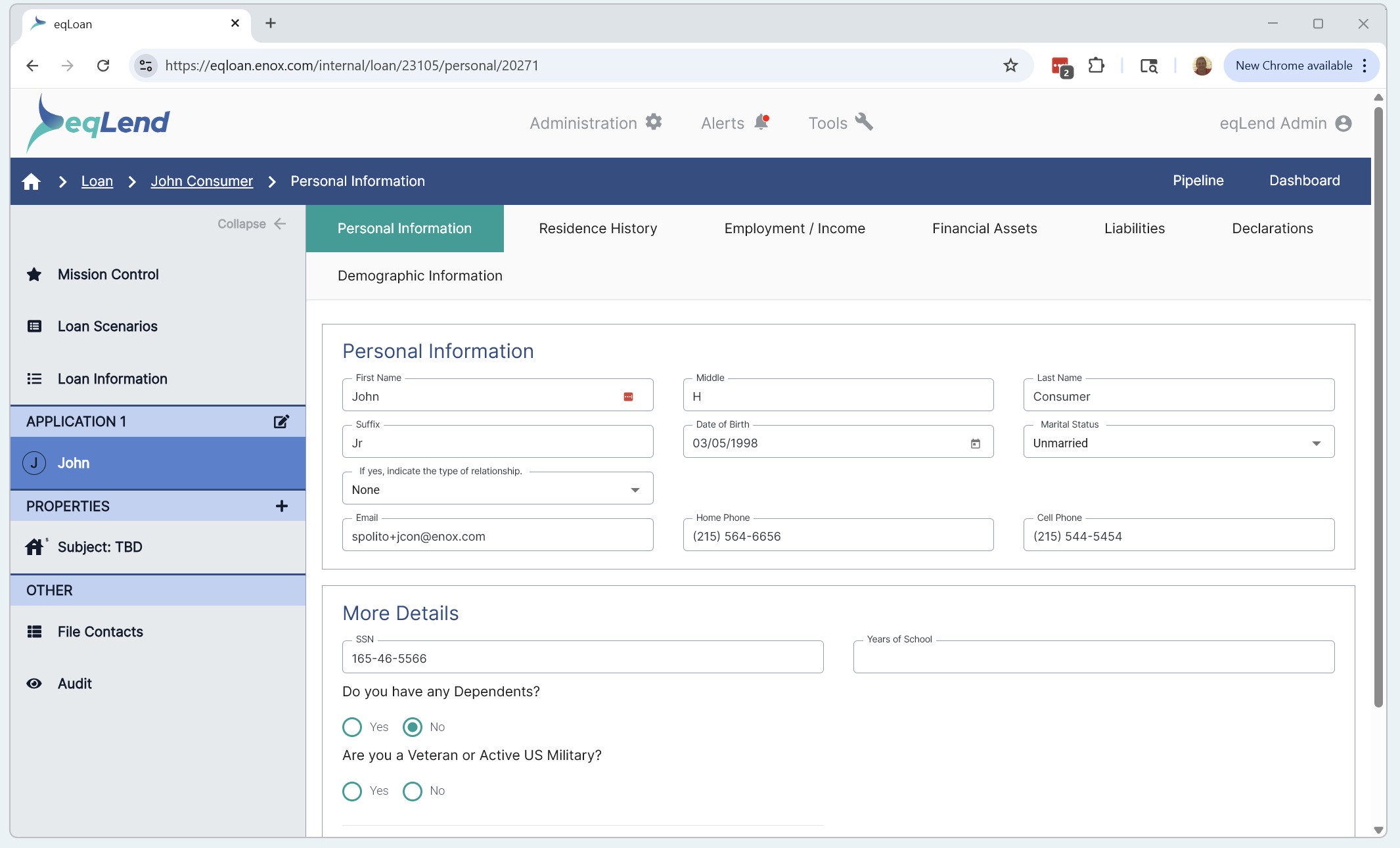
Pipeline & Loan View
Every loan, every task, every status — one screen
Drill into individual loans to see open tasks, processor assignments, borrower details, property info, lock expirations, and task groups — without leaving the eqLend interface or switching between Encompass screens.
- Loan-level detail view with borrower, property, and status at a glance
- Color-coded task statuses — Needed, Review, Processing — for instant triage
- Task groups mapped to operational stages: Document Review, Vendor Orders, and more
- Works in Encompass Desktop, Encompass Web, and the standalone Employee Portal
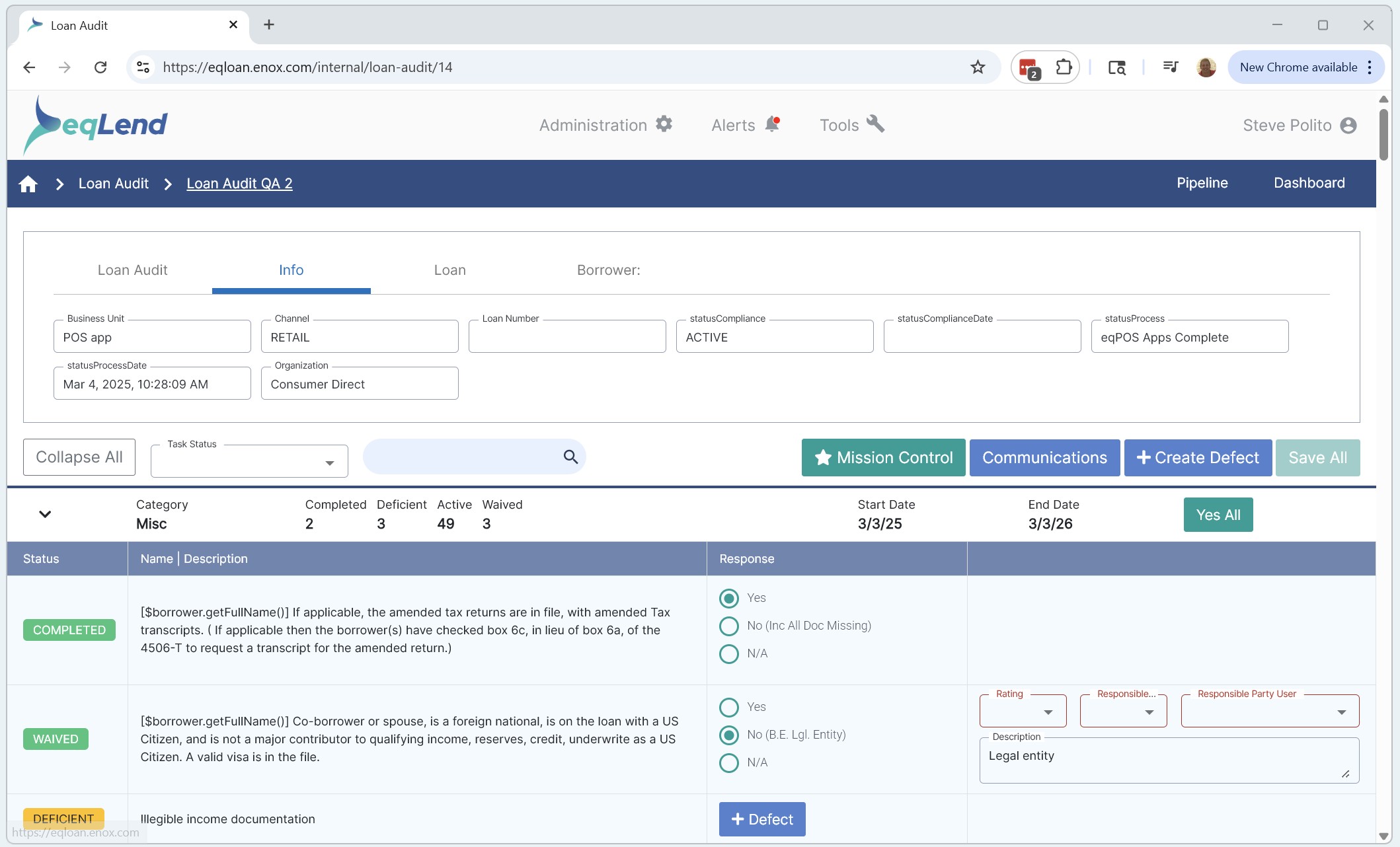
QA & Audit Deficiency Tracking
Built for compliance teams and quality control
Purpose-built screens for QA teams to track audit deficiencies, manage responses, and trend operational defects — directly inside the LOS. No uploading data to external systems.
- Audit deficiency and audit response tracking with visual trending
- Condition-level defect analysis — fix patterns system-wide, not loan-by-loan
- Empower internal and outsourced QA teams to work directly in the LOS
- Same role screens, portable across Desktop, Web, and standalone portal
Portable Across Environments
Every role screen is portable across Encompass Desktop, Encompass Web, and eqLend’s standalone Employee Portal. No re-implementation when migrating from Desktop to Web. Choose silent delivery for zero adoption risk, purpose-built screens for maximum efficiency, or combine both.
The Difference
“Other platforms make you rent their intelligence. eqLend makes you the owner of yours.”
Transparent rules. Portable IP. No lock-in. Your automation, your competitive advantage.
From the Field
Underwriters and ops teams see the difference
“Using both Auto UW Conditions and Auto UW eSign has been a tremendous time saver. One click and all conditions show up based on the loan type — it serves as a checklist for the underwriter. Being able to click one button for UW eSign and have documents pop up in the eFolder is huge.”
Patty Madison
Underwriter III
“The automated conditions have been a huge help and time saver. Most conditions required for the specific program have already populated. It helps cut down on items we might forget to add and results in a more well-underwritten file.”
Yesenia Grijalva
Underwriter
“With automated conditions, trending defects can be addressed immediately. A condition was created for VA manual loans and QC defects improved within 30 days. Automated conditions let us fix patterns system-wide, not loan-by-loan.”
Shirley Wingate
VP of Quality Control
Ready to Move
Your team has the intelligence. Let’s build the engine around it.
Schedule a demo built around your loan products, your workflows, and your Encompass environment. No generic pitch. No pressure.
Request a Demo